


In an era that places an extreme emphasis on visual impact, a stunning image is often more appealing than lengthy text. The rapid advancement of AI image generator technology has brought unprecedented innovation and development to photo editing. It has not only significantly improved creative efficiency but also lowered the barrier for people to create and edit images. Fotor’s AI photo editor integrates traditional photo editing with AI technology, introducing a series of powerful features that require no professional skills or complicated steps. Anyone can effortlessly complete complex image creation, making professional-quality visual content more accessible than ever.
At the same time, the rise of AI video generator technology further expands creative possibilities, offering users new ways to produce engaging and dynamic visual content alongside photo editing.
In this article, I will guide you through the main features of Fotor, from basic photo editing tools to its AI-powered image tools. Based on my own experience, I will also share some practical tips and insights. I hope this content can offer you helpful reference and inspiration.
What is Fotor?
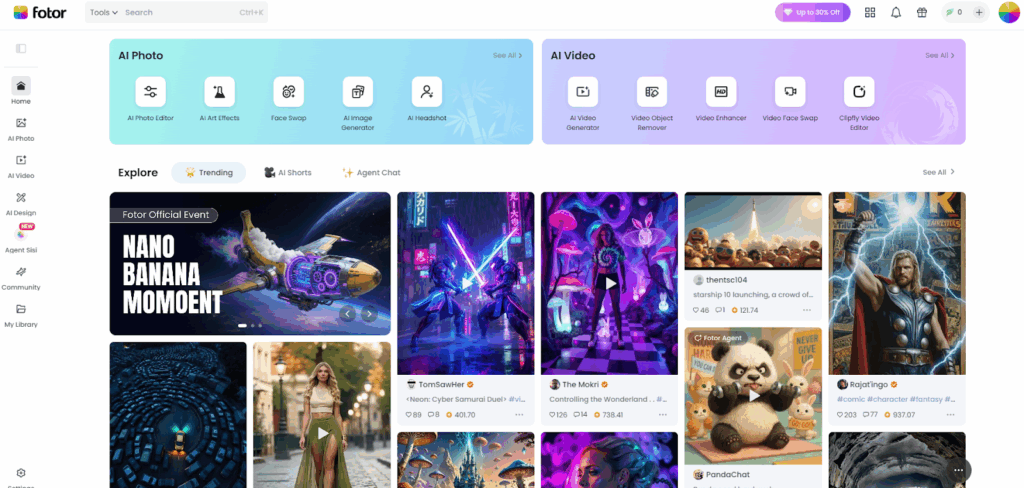
Fotor is a powerful image editing and design platform that stands out among many photo editing tools thanks to its intelligence, creativity, and rich features. It is widely favored by image creators. It not only offers professional, easy-to-use, and creative basic editing tools such as cropping, filters, enhancement, portrait retouching, and text editing, but also provides practical design features, including a variety of templates, elements, stickers, and fonts. Moreover, it leverages advanced AI technology to launch a range of unique and trend-driven tools, such as one-click enhancer, AI image generator, AI filters, background remover, AI replace, and more. These features not only make the creative process easier and more efficient, but also inspire users with fresh ideas during editing, enabling anyone to effortlessly produce professional-level visual content.
It’s undeniable that in today’s highly competitive image editing market, Fotor has managed to firmly establish itself with its outstanding features and user experience. Next, I’ll take you through its unique strengths and explore how it has won the favor of users among so many platforms.
What is Fotor’s AI Photo Editor?
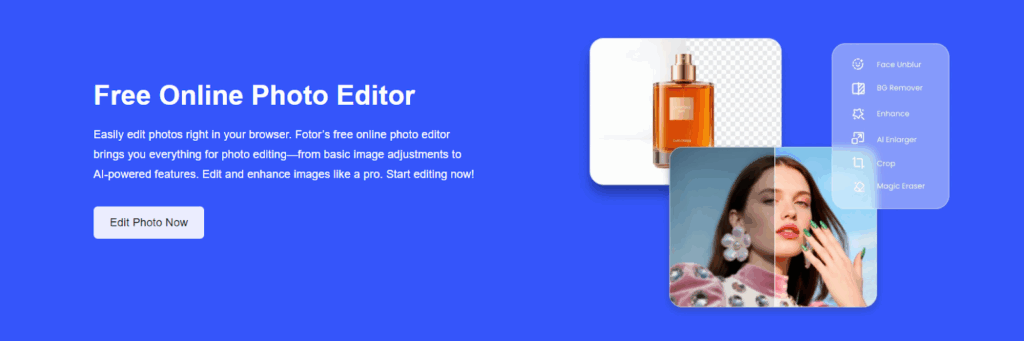
Fotor’s photo editor is a seamless integration of traditional photo editing and advanced AI technology, combining the strengths of both manual and automatic editing to deliver a comprehensive, efficient, and user-friendly experience. At the same time, it brings together a wide range of creative design tools, allowing you to flexibly choose based on your needs and effortlessly switch from basic retouching to advanced design. It makes high-quality image processing easy and accessible for everyone.
Basic Photo Editing Tools
Basic Edit: Basic photo editing includes image enhancement and adjustment, color correction, cropping and resizing, flipping, background blur, adding mosaic, text, borders, stickers and more. It meets simple everyday editing needs.
Portrait Retouch: A wide range of portrait retouching and beautification tools, including skin smoothing, face shaping, wrinkle removal, makeup for different facial features, red-eye removal, teeth whitening, and more. Whether it’s for everyday selfies or professional portrait photography, these tools help you effortlessly enhance your appearance and show your best self.
Photo Collage: Offers over 2000 collage layouts and templates, allowing you to easily create fun and creative photo collages.
Filters and Effects: A variety of classic and trendy photo filters, including scene, artistic, cinematic, holiday themes, and more, add rich visual effects and atmosphere to your photos.
Rich Elements: Built-in with a rich resource library, it offers users a large collection of photo materials, frames, collage templates, text styles, stickers, aspect ratio options, and more to meet a variety of user needs.
Format & Compression: Supports conversion between various image formats, such as JPG to PNG, JPG to PDF, JPG to GIF, PNG to JPEG, and more. It also supports image compression, making it easier for users to upload and use images across different platforms.
Photo Design Tools
Multiple Makers: A variety of makers are available, including poster maker, holiday card creator, business card designer, logo maker, sticker maker, meme generator and more. These tools are designed to meet users’ creative design needs.
For Social Media: Provides multiple design tools for social media, including Facebook covers, Instagram post images, YouTube thumbnails, WhatsApp stickers and emojis, as well as other content needed for different platforms. These tools fully meet the design needs of social media influencers and content creators.
Plenty of Templates and Materials: A wide range of design templates, photo materials, stickers, text, fonts, and backgrounds to meet different creative design ideas.
Pros and Cons Conclusion
Based on my general introduction and experience, I have summarized the following pros and cons for you:
Pros:
- User-friendly interface design and easy-to-use operation.
- Detailed instructions and clear user guidance.
- Available for direct use in a web browser, and also downloadable as desktop software and the mobile app.
- A one-stop solution for photo editing, addressing various needs.
- Continuously launching and updating interesting and innovative features.
- Supports batch photo editing and creation.
Cons:
- Sometimes the results after editing photos may not fully meet user expectations.
- To achieve more refined results, some photo editing and creation tasks can still be time-consuming.
Now that we have gained a deeper understanding of Fotor’s basic photo editing features, you might wonder what makes me recommend it to you, and why it stands out among so many platforms. The answer lies in its trendy and unique AI features. Next, I will walk you through these highlights in detail.
What are Fotor’s Unique AI Tools?
We can see that as a cutting-edge image and video editing platform in AI technology, Fotor fully leverages AI to launch a variety of innovative, intelligent, and creative tools. Next, I will introduce several AI features that are popular among users.
AI Image Generator
AI image generator is a powerful AI tool that allows you to turn your creative ideas into visuals by simply describing them in words. After entering your prompt and selecting your preferred image style, the AI will intelligently analyze your description and quickly generate images that match your expectations. You can also upload your own photo and choose a style, and the AI will recognize the content and details of your image to generate a version in the selected style. It’s easy to use and saves a great deal of time and effort in image creation. Whether you’re a beginner or a professional content creator, you can effortlessly produce stunning visuals.
AI Photo Enhancer
AI photo enhancer is a tool designed to improve image quality. Unlike traditional enhancement methods that require manual adjustment of various settings, this AI-powered tool only needs you to upload your photo. With just one click, the AI automatically enhances the image without compromising its original quality. This includes adjusting tone and color, removing blur, sharpening, reducing noise, eliminating pixelation, and even restoring old photos. It significantly reduces the need for manual editing, saving time and improving the efficiency and convenience of photo enhancement.
AI Filter
Fotor’s GoArt offers a wide variety of AI filters and effects that allow you to transform your photos into your preferred styles with just one click. Whether it’s anime style, cinematic style, game-inspired visuals, artistic effects, 3D looks, or cyberpunk aesthetics, or even popular trends like Studio Ghibli, The Simpsons, Muppets, figurine style, or Barbie-inspired themes — GoArt helps infuse any image with personality and artistic flair.
Background Remover and Changer
Background remover and changer is an AI-powered tool designed to handle image backgrounds with ease. It eliminates the need for manual editing by fully automating the background removal and replacement process. Using advanced AI algorithms, it quickly detects the subject in the image while preserving complex details and edges. It then smoothly performs tasks such as creating transparent backgrounds, removing or blurring backgrounds, and offers a variety of background templates, making it easier than ever to switch and customize your image background.
AI Headshot and Avatar Generator
This is also a very user-friendly AI tool that offers a wide range of style templates and presets. You simply choose a few styles you like and upload your photo. The AI intelligently recognizes facial features and image details to create personalized avatars. It even supports team avatar generation. Whether it is for formal occasions, brand presentations, gaming channels, social media, team introductions, or other creative uses, it can fully meet your needs. It can also generate virtual avatars suitable for VR, the metaverse, and other digital platforms.
AI Replace
This is an AI feature that allows you to replace objects in an image. You can use the magic brush to paint over the area you want to replace or use quick select to fast select the region. Then, simply enter a text description of what you want to replace it with, and the AI will transform the selected area accordingly. With this tool, you can replace objects, change hairstyles or hair color in portraits, swap faces, alter local image styles, change backgrounds, or even add new elements to the image. It empowers you to create a wide range of creative visuals with ease.
How Do I Evaluate?
The AI tools I introduced to you are just the tip of the iceberg of Fotor’s capabilities. In fact, it offers many more tools and is constantly being updated and improved. As a user who has experienced many of its AI features, what satisfies me the most is that it greatly lowers the barrier to creation. You don’t need professional design or photo editing skills; with just a few simple steps, you can easily create your own visual masterpieces.
With the help of AI, the efficiency of image editing and production is greatly improved, and the flexibility of work is significantly enhanced. At the same time, it retains the traditional functions of image creation, allowing for professional-level results that reach the highest standards.
Of course, it also has some drawbacks. For example, the AI-generated images are sometimes not very realistic or fail to fully satisfy me, and occasionally there can be distortions when changing image styles. However, as a user, I believe that Fotor will continue to improve and perfect its features.
Who is Suitable for Its AI Photo Editor?
Businesses or Individual Workers:
Whether for businesses or individual workers, those who need a large number of high-quality images for presentations, marketing, or other purposes can use AI image editors to reduce manual editing time and costs, thereby improving work efficiency.
Photographers and Image Creators:
Professional photographers and image creators, as well as amateur enthusiasts, can use AI to quickly optimize photos, enhance image quality, and repair photo defects without complicated or excessive operations. It is simple and easy to use.
Designers and Artists:
AI image editors simplify the design process for designers and artists by offering a wide variety of styles and artistic effects, allowing them to focus more on creation. AI can also bring more inspiration and ideas to their designs and artworks.
Social Media Content Creators:
Social media creators, bloggers, and influencers need stylish and attractive images to promote their accounts. AI provides fast image editing that makes their pictures more appealing and helps increase their follower count. They also enjoy exploring and using more interesting AI features.
Beginners and Novices in Photo Editing:
For those who lack experience in image creation and editing but wish to produce high-quality images or want to learn image design and editing, using AI tools is a great way to start learning and creating.
Conclusion of This Article
AI technology holds immense potential. With the help of AI tools, everyone can become a visual artist. It empowers us to explore infinite possibilities, unleash boundless creativity, and create stunning image works. Creativity is no longer restricted by professional barriers, inspiration flows freely, and beauty begins with “me.” Use AI to embark on your own unique journey into the world of visual art.
Common Queries You May Ask
Is Fotor AI photo editor free?
Yes, its online photo editor offers a wide range of features for free. Users can edit and download edited photos without watermarks for free. Some advanced features and AI tools are only available with a Fotor Pro subscription.
What image formats does Fotor photo editor support?
It supports almost all popular image formats, including JPG, PNG, WebP, HEIC, and HEIF.
Will my image quality be reduced after editing?
No, its photo editor allows you to export edited images in high resolution. Your final results are sharp and clear.
Can I use Fotor photo editor on desktop or mobile?
Yes, its photo editor is available on Windows, Mac, iOS, and Android devices. You can edit and enhance your photos from anywhere and anytime with just one account.
Will Fotor guarantee users’ privacy and safety?
Fotor has comprehensive policies to protect user privacy, including likeness, copyright, personal information, and other rights. It also prioritizes safeguarding users from potential online security threats.